Automating Processes: What Pays Off and What Doesn't
Almost anything can be automated technically. So the arithmetic decides, not the feasibility: five variables, one case worked through in full.

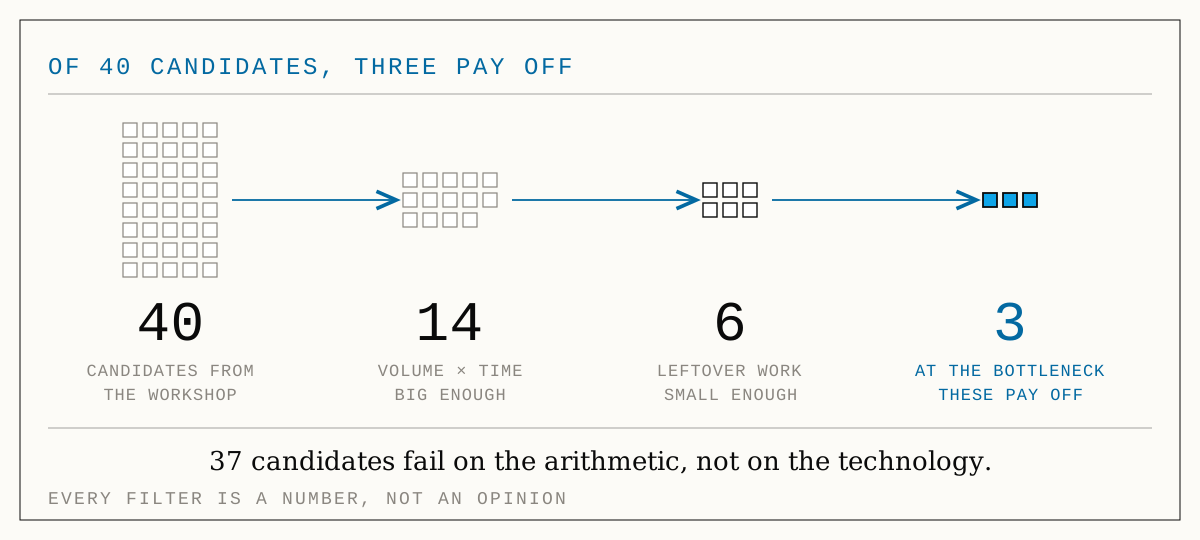
Automating Processes: What Pays Off and What Doesn't
Ask a vendor whether your process can be automated and the answer is almost always yes. That is not a sales trick; it has simply been true for a few years now. Reading documents, moving data between systems, granting approvals by rule, generating text, spotting exceptions: what used to be an integration project five years ago is now assembled in days.
Which is exactly why feasibility has become worthless as a selection criterion. When almost everything is possible, "can we do this?" no longer sorts anything. The question that does sort is a commercial one: what does it return, what does it cost, and when is the money back? Remarkably few automation projects ask it. And that is why so many companies run half a dozen automations and still cannot say what they earned from them.
This article supplies the arithmetic. It sets out the model in five variables, works one typical case through in full, names the three numbers that are almost always wrong, and finishes with the cases where the honest answer is no. It is deliberately not a list of 25 automation ideas. Ideas are plentiful. What is missing is the selection.
The arithmetic, in five variables
The core fits in three lines. Everything else is care with the inputs.
textGross saving/year = cases/year × (handling time − leftover work) × fully loaded rate Net saving/year = gross saving − running cost (licences, operations, maintenance) Payback = investment ÷ net saving
So five variables decide, and each one has a typical failure mode:
Cases per year. The one figure almost every company can supply reliably; it sits in the ERP, in the inbox, in the ticket system. Take the real number, not the felt one, and take it per year, not per day. Automation scales with volume; below roughly 200 cases a year the lever is usually too small for anything that takes more than an afternoon to build.
Handling time today. Not the time the task "should" take, but the time it actually costs, including searching, asking around, correcting and picking the task back up after an interruption. That time is routinely twice what the team reports about itself.
Leftover work after automation. The most frequently omitted variable, and more on it in a moment. No process disappears entirely. Checking remains, exceptions remain, and so does reworking the cases the automation does not get cleanly through.
Fully loaded rate. Not gross salary, but the cost per productive hour including employer contributions, holiday, sickness and workplace. For commercial back office work in many mid-sized companies that lands somewhere between 40 and 55 euro. Use your own figure, not a rule of thumb from the internet.
Running cost. Licences, API consumption, hosting and above all maintenance. An automation is not a piece of furniture. Interfaces change, forms change, rules change. Budget 10 to 20 percent of the investment per year, or the arithmetic in year three will look nothing like year one.
Three numbers that are almost always wrong
The formula is trivial. Automation decisions go wrong not at the formula but at three places inside it.
One: leftover work is set to zero. The standard error runs: "6 minutes per case times 11,000 cases, that is what we save." In reality an automation rarely replaces the whole step. It handles the normal case, and a person checks the result and works through the exceptions. So there are two questions that matter: how many cases really run through untouched (the straight-through rate)? And how long does checking the rest take? With clean, uniform input data, 85 to 95 percent straight through is realistic. With paper, handwriting, free text or twenty different supplier formats, more like 60 to 80 percent, and the whole calculation shifts.
Two: saved minutes get booked as saved money. This is the most expensive error, because it inflates the number the most. 693 saved working hours a year are only 31,000 euro if those hours subsequently earn something or no longer have to be paid for at all. If the same team keeps drawing the same salaries and the freed-up time seeps into day-to-day work, nothing about the result has changed. The saving becomes real only when one of three conditions holds: you grow without hiring, you cut overtime or outside services, or the time demonstrably flows into something value-creating. If none of them holds, the honest benefit is "relief": a legitimate goal, but not one you may put into an investment case in euro.
Three: the calculation uses an average. "The case takes 6 minutes and we have 50 a day" is convenient and rarely true. In reality it is 40 to 60 cases and 4 to 11 minutes, and it is precisely the bad combinations, where a peak arrival meets difficult cases, that hurt. So do not calculate one result, calculate three: conservative, mid, optimistic. A decision that only holds in the optimistic case is not a decision.
The distance between the top bar and the bottom one is the whole point. Put 300 minutes into the business case and you are claiming roughly 59 percent more than the process has to give. That is enough to wave through an investment that never pays back.
One case, worked through in full
Take the most common candidate in the mid-market: order entry. Orders arrive as PDFs, as email text, occasionally by fax. Somebody reads them, types them into the ERP, checks part numbers and prices, files them.
The starting point: 50 orders a day, 220 working days, so 11,000 cases a year. Six minutes per order comes to 1,100 hours. At a fully loaded rate of 45 euro that is 49,500 euro of staff cost a year, for data entry alone.
The automation: the inbox is picked up, the document is read, line items are checked against the item master and price list, the order is created in the ERP. The person confirms instead of typing. What remains: 1.5 minutes of checking per case plus 12 percent exceptions that still run entirely by hand. Together that is 407 hours a year, or 18,315 euro.
The gross saving is therefore 693 hours, or 31,185 euro. From that, 8,100 euro of running cost comes off: 3,600 euro for licences and consumption, maintenance at 15 percent of the investment. That leaves 23,085 euro net per year.
And now the question this is really about: is a 30,000 euro project worth it? At 23,085 euro net per year the investment is back in just under 16 months. That is a good deal, in the mid scenario.
Calculate conservatively and it looks different. At 45 cases a day, 2.5 minutes of checking and 15 percent exceptions, 11,205 euro net remains, and the investment is only earned back after about 32 months, for a piece of technology whose own half-life is not much longer than that. In the optimistic case, by contrast, with 60 cases and clean input data, it is 34,668 euro a year and 10 months.
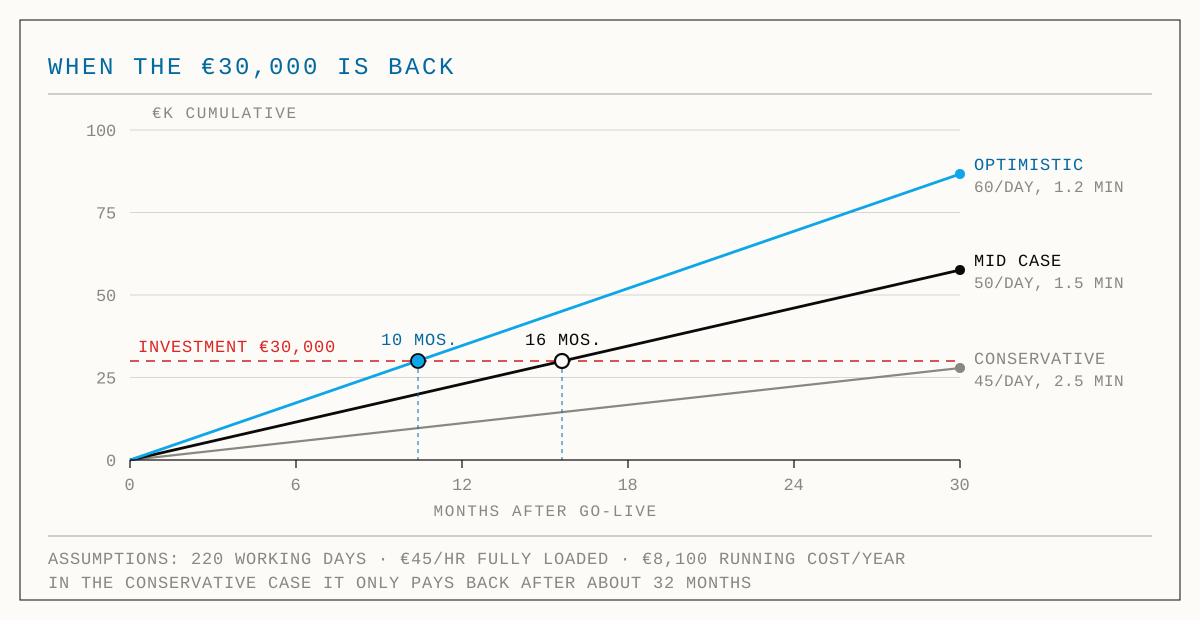
Same automation, same technology, three very different decisions. Between "earned back in ten months" and "earned back in almost three years" there is no technical difference, only a difference in the quality of the data coming in. Which is why the preparation that pays off most is almost never the choice of tool, but the question of how uniform the incoming cases are and whether anything can be done about that first.
The mistake that makes the whole calculation worthless
So far we have looked at a single step. In practice that step sits in a chain. And that is where the most expensive mistake of all happens: you automate somewhere that is not the bottleneck.
An example with three steps. Data entry handles 150 cases a day, the specialist review 120, approval 200. Throughput of the chain is therefore 120, set by the weakest link and not by the average.
Now you invest 30,000 euro. Option A automates data entry; afterwards it handles 400 cases instead of 150. Throughput of the chain: still 120. You bought capacity at a place where none was missing. Option B automates the review; afterwards it handles 310 instead of 120. Throughput rises to 150, now limited by data entry, which has become the new bottleneck.
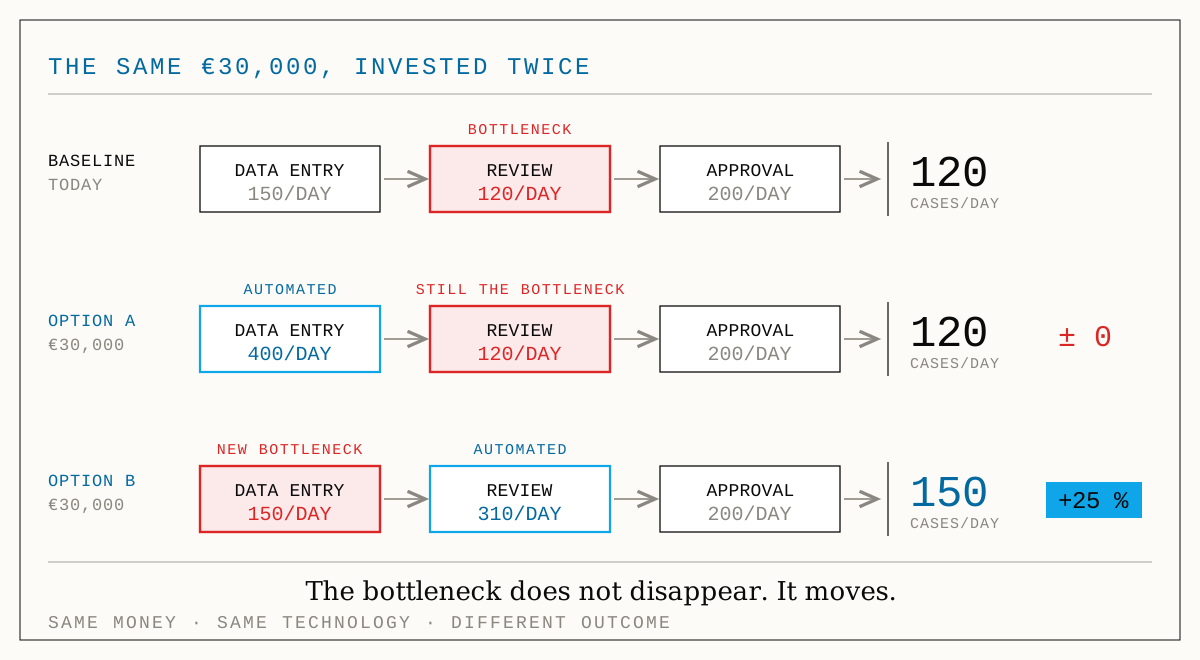
Two lessons sit in that. First: time saved at a step that does not bind produces not a single additional case. At best it produces relief, and relief, as above, may not be booked as return. The second is less comfortable: even the right decision delivers less than the isolated view promises. Option B lifts throughput by 25 percent, not by 158 percent, because the bottleneck does not disappear, it moves. Anyone who plans the second step before buying the first is calculating more honestly.
This is exactly where the spreadsheet stops helping. A chain with queues, fluctuating arrivals and mutual dependencies cannot sensibly be estimated with averages; it has to be run. That is what we built FlowVisual for, a process simulator for Mac and Windows in which you model the flow from a few building blocks, stress test it across hundreds of simulated days under realistically fluctuating load, and see which step binds how often. Not as an average but as a range: P10 to P90 instead of one suspiciously smooth number. Then you change one lever (automate a step, halve a handling time, add a person) and read the before and after in cycle time and in euro.
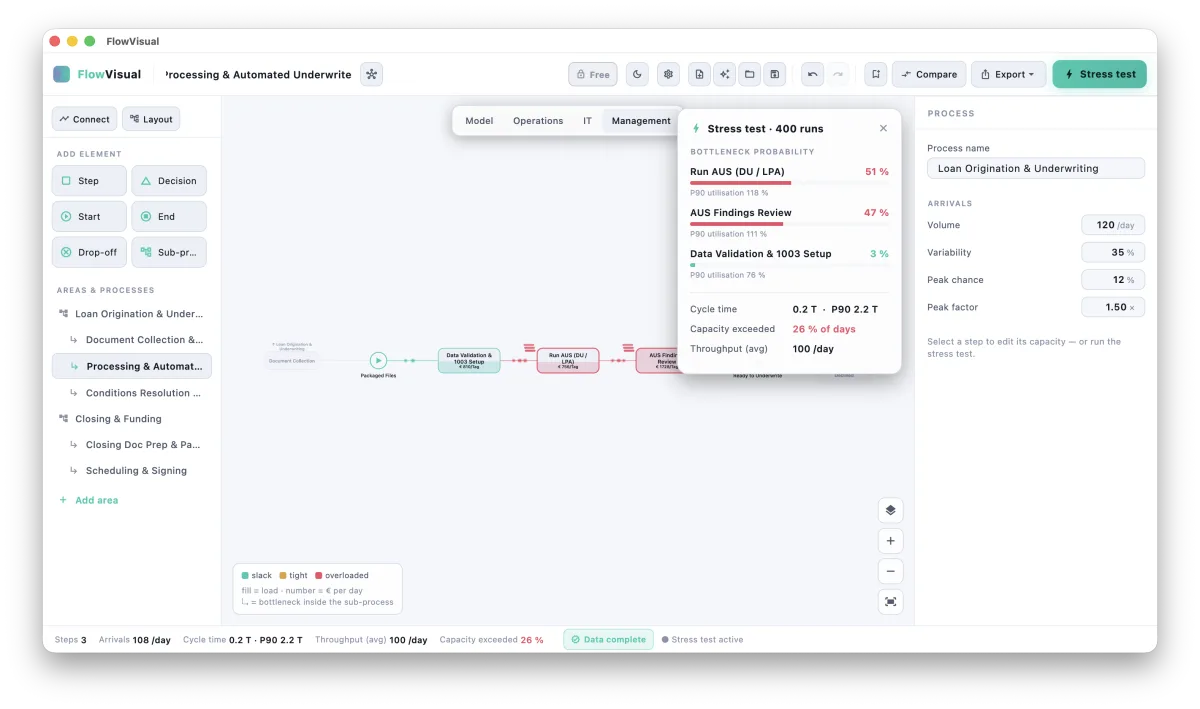
The long-form argument for why a running model beats a drawn flowchart sits in its own article. For the automation decision the short version is enough: before you put 30,000 euro on one step, you should know whether that step binds at all.
When automation does not pay off
A decision model that always says yes is not a model. These six cases are common, and in all six the right answer is no.
Too little volume. Below roughly 200 cases a year, hardly any automation carries its own maintenance. A good template, a checklist or a text block beats any tool here.
Every case is different. Automation lives on repetition. If every case demands its own judgement, the rules become more expensive than the work they are meant to replace. And every exception costs twice, because it runs first through the automation and then through a person.
The process is broken, not slow. If three systems hold the same data and nobody knows which one is right, you are automating the confusion. Clean up first, then build. Automated nonsense is faster nonsense.
The process is about to change anyway. If an ERP migration, a change in the law or a new core system is twelve months out, you are building on sand. Waiting here is an active decision, not inaction.
The step is not the bottleneck. See above. The most common reason for automations nobody would have missed.
The effort is spread across slices of minutes. Five minutes a day across twenty people is around 370 hours a year on paper, but in practice nobody you can release or redeploy. Scattered time is hard to collect. That is not an argument against automating, but a strong one against the number in the presentation.
The right-hand edge deserves its own remark. Very high volumes are not automatically the best argument for building your own. Above a certain scale there is often off-the-shelf software for the standard case that costs less than any custom build. So the make-or-buy question survives inside the automation decision as well. We have covered it in more depth elsewhere.
- peopleJudgement, negotiation, exceptionsAnything that needs context, experience or accountability. Automate the preparation here, not the decision.
- partlyChecking and approvingSplittable: the rule cases run through, the edge cases go to a person. This is exactly where the leftover work you have to budget for comes from.
- pays offCapturing, transferring, reconciling, notifyingUniform high-volume work with a clear rule and measurable volume. Incoming invoices, order entry, master data upkeep, status notifications.
The approach in five steps
All of this implies a sequence. It is unspectacular, and that is precisely its advantage: every step can return the answer no, and the earlier that happens, the cheaper the insight was.
- Find the bottleneck instead of guessing it. Ask five people on the team and you get five answers, each shaped by where that person sits. A structured pass is faster and less prone to the loudest voice. Our Bottleneck Diagnosis asks seven questions and names the process that costs you most.
- Put today's cost in ranges. Not "roughly 50,000 euro", but a lower and an upper bound, each traceable to an assumption you can defend. The Process Cost Analyzer works exactly that way, with ranges instead of false precision.
- Check the preconditions. Data quality, system landscape, interfaces, documentation. This is where it is decided whether the straight-through rate lands at 90 or at 65 percent, and with it half the calculation. Digitalization Maturity measures that across five dimensions.
- Do the sums, with no as a permitted result. Investment against net saving, in three scenarios. The Automation Check walks through exactly that calculation and also says when it does not add up.
- Simulate the effect before you promise it. The four steps before this look at a process in isolation. Whether the improvement actually lands in the chain only shows in a model that runs. FlowVisual turns it into a before and after in cycle time and euro, including the question of where the bottleneck moves next.
The four tools at flowrefy.com are free and work without signup; results export as PDF. FlowVisual is a desktop application for Mac and Windows, free for 14 days and paid after that; all models stay local on your machine, with no cloud and no account. We built both ourselves, and both came out of the same irritation: that automation decisions are far too often made without numbers.
Where we stand
At balane we advise, build and automate, and we look at every undertaking through three lenses at once: commercial, psychological and technical. In automation decisions those three interlock especially tightly. The commercial lens sets up the arithmetic and accepts no as a result. The technical lens says how high the straight-through rate will realistically be and what maintenance will cost. And the psychological lens decides whether the result actually gets used, or whether the old spreadsheet keeps running quietly in the background because nobody trusts the automation.
What sets us apart from the usual story is not a technology but a sequence: we do the sums first. That is occasionally the weaker sales argument and almost always the better basis for a decision.

